

Examples
Run all commands from the repository root. Run
npm cibefore the first launch, andnpm run buildafter source changes. Graphics examples require a working display server and OpenGL context.
Project home · Quick start · Development guide
Start here
node examples/breakout.cjs
node examples/all-types.cjs --frames=120
node examples/render-texture.cjs --frames=120
node examples/network.cjs
After building, run scripts directly; npm run demo:* rebuilds as configured in package.json. Check each graphics script for supported frame-count, font and other arguments.
Play Breakout
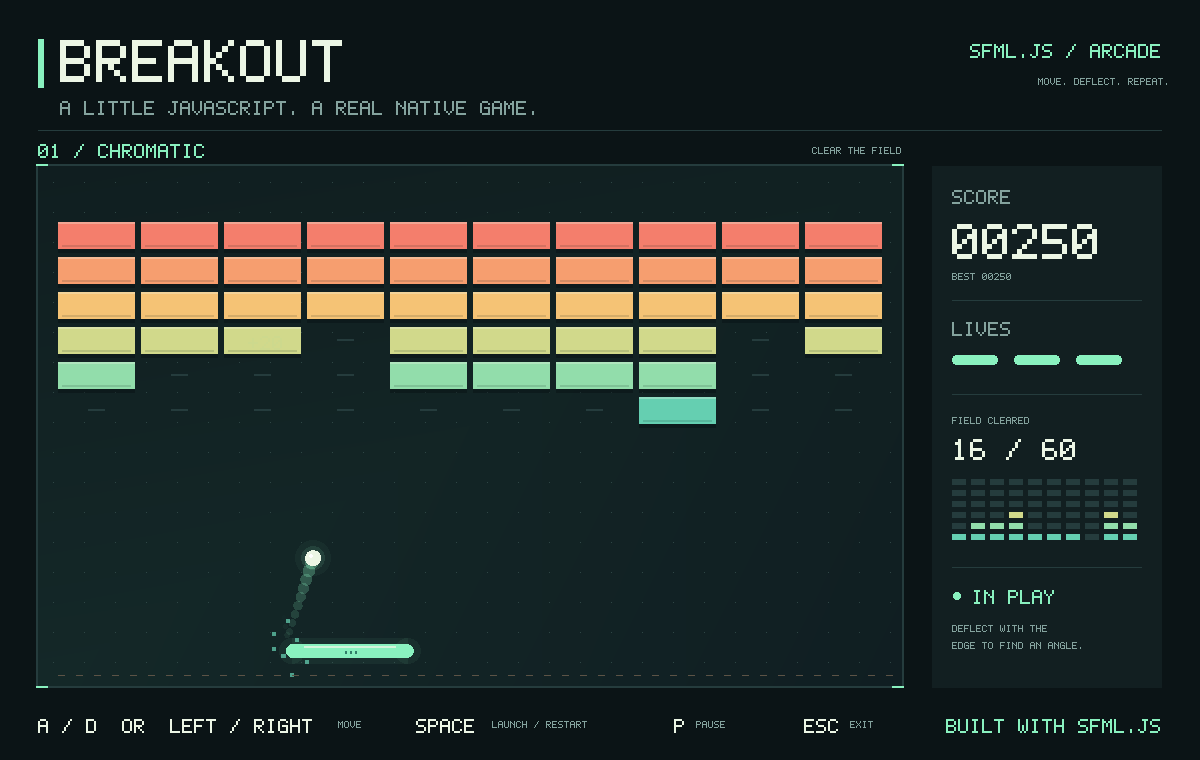
breakout.cjs is a complete game with brick collisions, three lives, scoring and win/loss states. Move with Left/Right or A/D; Space launches or restarts, P pauses, and Esc exits. Losing focus pauses interactive play.
Use npm run demo:breakout to build and launch. For a reproducible gameplay capture on macOS/Linux:
SFML_DEMO_SNAPSHOT=/tmp/sfml-breakout.png \
  node examples/breakout.cjs --autoplay --frames=900
The screenshot saves the actual native framebuffer at the final frame. --autoplay controls the paddle; --frames bounds the run. node examples/breakout.cjs --self-test checks the game logic without opening a window.
Graphics and windows
| File | Demonstration | npm command |
|---|---|---|
| all-types.cjs | Combined scene with value types, transforms, shapes, vertices and text | demo:types |
| sprites.cjs | Drawing large numbers of sprites | demo |
| image.cjs | Pixel editing, copying, masking and codecs | demo:image |
| texture.cjs | Image loading, cropping, partial uploads and sampling | demo:texture |
| sprite.cjs | Sprite animation, flipping, colors and bounds | demo:sprite |
| render-texture.cjs | Off-screen composition, texture views and draw snapshots | demo:render-texture |
| drawable.cjs | Custom composition, parent-child transforms, blending and stencil | demo:drawable |
| vertex-array.cjs | Dynamic tiles and contiguous vertices | demo:vertices |
| text.cjs | Text layout and vertex animation | demo:text |
| window.cjs | Window events, cursors and input diagnostics | demo:window |
| system-window.cjs | System and Window APIs | demo:system-window |
Most continuously rendering examples exit with Esc; pass --frames=120 to limit their runtime. The text example accepts --font=/path/to/font.ttf and --text=中文示例 to specify the font and text; Chinese text requires the corresponding glyphs.
Some diagnostic examples use internal repository preview and verification helpers. For a new application, use the window code in Quick start, which uses only public APIs.
Audio and networking
| File | Demonstration |
|---|---|
| audio.cjs | Sound, Music, Worker data production, effects and recording playback |
| audio-worker.cjs | tone and filter Worker factories loaded by the audio example |
| network.cjs | Local TCP, Packet, UDP and Selector |
| sleep-err.cjs | Asynchronous waiting and SFML log output |
| vector-scalars.cjs | Vector operations with different numeric scalar types |
In the audio example, keys 1-4 switch modes, Space plays/pauses, S stops, E toggles effects, R/T start/stop recording, and arrow keys adjust panning and volume. Recording uses the system microphone; normal startup waits for key presses.
Screenshots
Graphics examples supporting SFML_DEMO_SNAPSHOT can save their rendered output. For example, on macOS/Linux:
SFML_DEMO_SNAPSHOT=/tmp/sfml-render-texture.png \
  node examples/render-texture.cjs --frames=2
PowerShell:
$env:SFML_DEMO_SNAPSHOT = "$env:TEMP/sfml-render-texture.png"
node examples/render-texture.cjs --frames=2
Remove-Item Env:SFML_DEMO_SNAPSHOT
The combined all-types example saves PPM; other examples use the formats implemented by their entry points. Static screenshots demonstrate only the specified scene's rendering result, not throughput, sound output or input-device testing.
Legacy examples
ported/ retains the original 16 scripts: 14 run with the current API, while 2 depend on legacy asynchronous drawing APIs and report that they are unsupported.
npm run test:portedall-types-scene.cjs and bitmap-label.cjs are demo helpers, not standalone application entry points.